All User Evaluation features on one page
Interview real people, test your product with AI agents, and read study reports that link each claim to its clip. This page shows 86 features in nine areas.
You do not need a credit card or a demo call.
AI interviews and live interviews
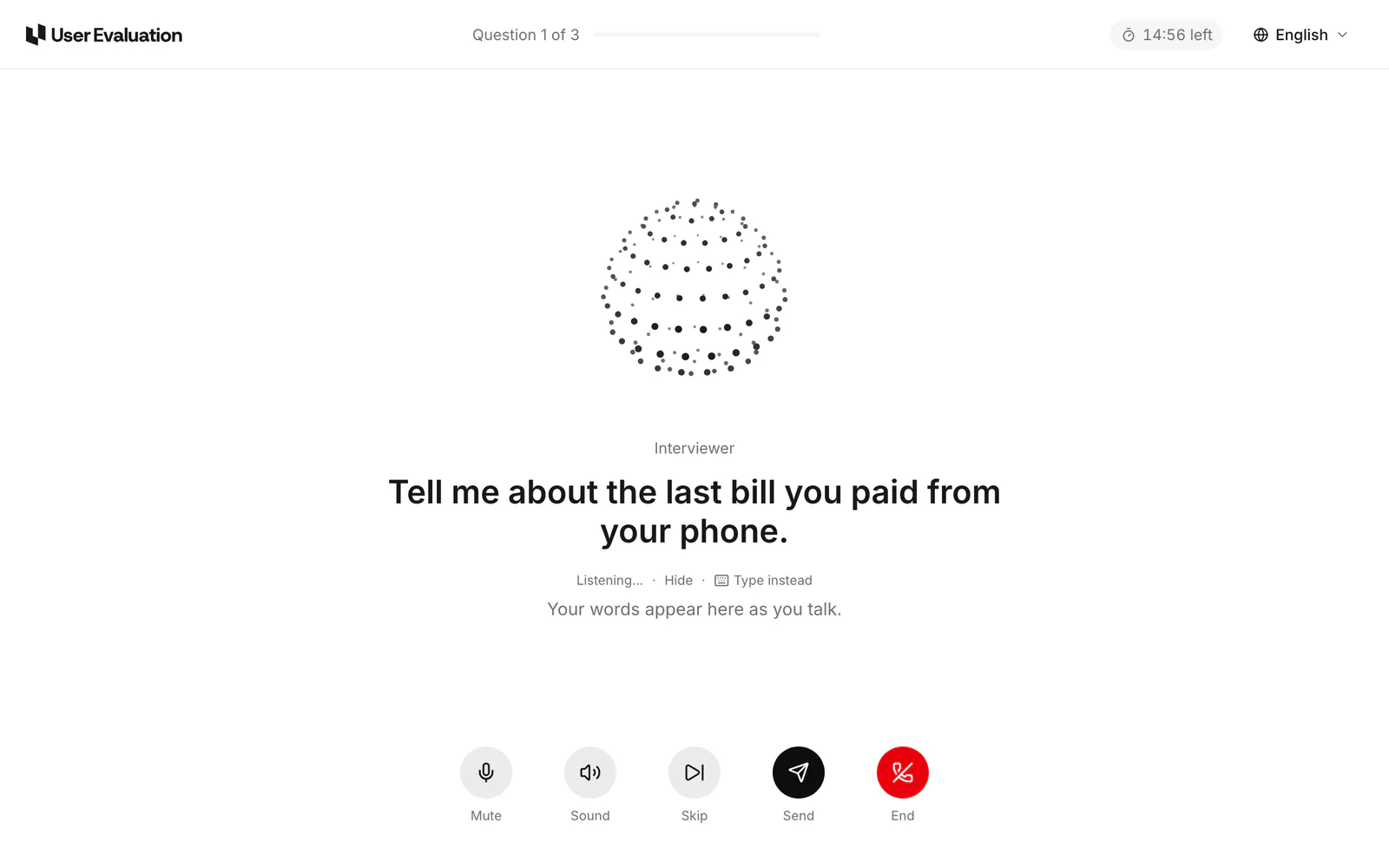
An AI interviewer speaks with people by voice and uses your guide. Or you do the call yourself. All interviews go into the same evidence base.
AI voice interviews
The AI speaks your questions and asks follow-up questions about each answer. An interview is 15, 30 or 45 minutes.
Flexible or fixed order
The moderator can change the order of the questions when necessary. Or it asks all participants the same questions in the same order.
Follow-up depth
Select light, standard or deep. The AI asks zero, one or two follow-up questions for each question. The AI selects the topics.
Interviews in 40+ languages
Select the language of the interview. You get the study report in your language.
Guides that Eva writes
Ask a question, and Eva writes a title, about five open questions with follow-ups, and a screener. You can edit all of it.
Screeners with AI conditions
Add up to 15 questions with answers that qualify or disqualify a person. You can also add a plain condition that the AI checks.
Show content in the interview
Show images, a video, a website, a Figma prototype or a YouTube video at a question that you select. A random order is possible.
On-screen questions
Add scale, NPS, single-choice or multiple-choice questions. The AI stops and shows the question on the screen. The study report shows the answers in a chart.
Test the interview first
Do the interview yourself for free. Then Eva reviews the guide and suggests changes that you can apply with one click.
Live interviews
Do the call yourself in our browser call room. Your discussion guide and private notes show next to the call.
Built-in calendar
Set the hosts, the available times, the slot length and a buffer. Qualified people select a time, and they can change it.
Listen to an interview
Follow an AI interview while it occurs. The live transcript is a few seconds behind. The participant cannot hear you.
Call notetaker
Send the notetaker to a Zoom or Google Meet call. The recording goes into your Library with a transcript.
Text surveys
People write their answers, and the AI asks follow-up questions. Surveys are free with your own people. A response from our panel costs $3.
Website surveys
You write a brief. When an event occurs on your site, a small chat opens. The AI asks the visitor about your brief and asks follow-up questions.
This is what a participant sees. The AI interviewer speaks one question at a time. Their words show on the screen as they talk. They do not install anything. How Interviews work
Your people, or ours
Invite your own customers with a link, or find people from our panel. The price depends on the participants, not on your plan.
Your own people, $10
Each study has a participant link. Send it by email, in your app or in a support reply. Your first three interviews are free.
Everyday people, $39
We find consumers from our panel. You filter them by country, age, gender, language, occupation and industry.
Professionals, $99
We find people by job title, industry, seniority, company size and the tools that they use.
Help finding the right people
Our team reviews your criteria and personally sources suitable participants. We’ll be in touch about recruiting and timing after you launch.
Free replacements
Flag a low-quality interview, and a new person replaces the participant. The old interview leaves the study report, and you pay nothing.
Recruitment deadlines
Set a deadline, and recruitment stops at that time, even if the study is not full. Without a deadline, invitations stay open for 7 days.
Payment by bank transfer
We pay panel participants for each completed interview, by bank transfer in US dollars, and we take no fees.
Or by bank transfer
Participants can select a bank transfer. Stripe collects and checks their bank details.
Pay and statements
Participants see each interview, their pay and their payouts. They can download a statement for each payout.
AI agents that use your product
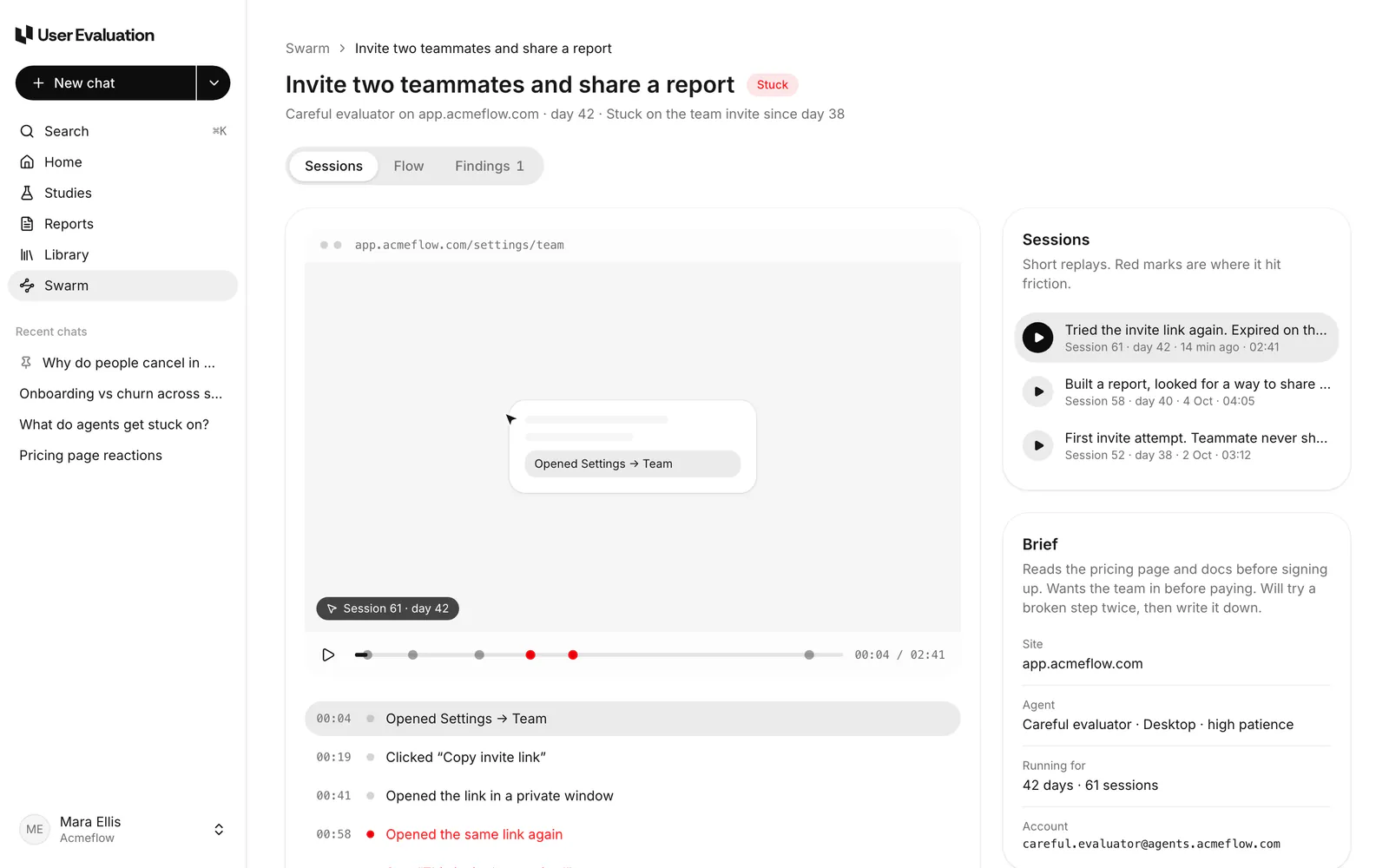
Swarm sends AI agents through your website in a real browser. Each agent acts as a different type of user. Swarm shows where the agents had problems.
Persona agents in a real browser
Personas go from a careful evaluator to a fast trial user. Use 1 to 50 agents, on desktop or mobile, with low to high patience.
Access that you control
Agents make an account, use a test account or use a magic link. We encrypt secrets, and the AI never sees them.
Any website, no set-up
Paste a link and the agents start. Nothing to install on your site, no tags or DNS records.
Safety rules on by default
Agents do not do destructive actions, payments or emails to real users. The run stops when the server has errors.
Session replays
Each step shows the page, the action, a one-line reason and a screenshot. Red marks show problems.
The Flow tab
A map shows each screen that the agents saw, from left to right. You can pan and zoom the map.
Findings with steps
Each problem has a severity, the number of agents that had it, steps to reproduce it and evidence clips.
Confirm with five people
One click makes a short AI interview with five everyday people. It checks a finding and costs $195.
Watch it live
New steps show as the agents do them. You also see the AI cost so far and the cost limit for the run.
Ask Eva about a run
Ask where mobile agents stopped, or what busy founders did not see. Eva answers from the sessions, with citations.
Daily or weekly runs
Do one run, or run each day or week for 7 to 90 days. You can pause and resume at any time.
Runs in your plan
Free has 1 run a month, Pro has 5 and Team has 25. We charge nothing before you click Start.
This is a run in Swarm. You see the session replay with its problem marks, each step of the agent and the brief of the agent. How Swarm works
Study reports with a clip for each claim
Make a study report, and each claim cites the moment that it comes from. Then make reports, boards and highlight reels from it.
Study reports with citations
A study report has themes and claims, and each claim has a clip. You cannot save a claim without a clip.
Confidence for each theme
Each theme has high, medium or low confidence and a count of cited items. We label weak evidence, and we do not remove it.
Labels on agent evidence
We mark clips from Swarm agents as agent clips. Their confidence stays at medium until people confirm them.
Ask the evidence
Ask a question about a study report. The answer uses only that study, and each line has a citation.
Reports from templates
Select a summary, jobs to be done, churn drivers, opposite views, opportunity areas or usability findings.
Review and publish
Edit a report like a document, and add clips and comments. Send it for review, then publish it to your team. We keep 20 versions.
Deck view
Show a report as slides, up to 15. The citations stay in the slides.
Boards
Put the clips of a study in lanes by theme, persona or phase. You can move, rename and merge lanes.
Clips
Put the pointer on a transcript line, click Clip and trim it. A clip can be up to 15 minutes, and it becomes evidence for the study report.
Highlight reels
Put up to 12 of the best clips of a study in order, with a title card.
Update as the study grows
Did new interviews arrive? Click Regenerate, and Eva writes the themes and claims again from all the evidence in the study.
What to test next
Each study report ends with up to ten next steps and the numbers for the study.
Eva, the research agent
Ask Eva in plain words. Eva answers from your evidence with citations. Eva also does work: it writes studies, prepares runs and writes reports.
Answers from your evidence
Eva uses studies, sessions, clips, study reports, Swarm runs and Library files. Each claim has a citation.
Web, papers and Reddit
Enable outside sources for more context. Eva shows which claims come from your own evidence.
Deep research
Eva writes a longer research report in many steps, with citations.
Charts in the answer
Ask for a count, and a bar, pie or flow chart shows in the chat. You can save the chart.
Draft studies and runs
Eva writes the guide and the screener, sets the audience and estimates the cost. Eva can also prepare a Swarm run.
Approvals for money and people
Eva waits for your approval before it starts a study, sends email to people or starts a run. The card shows the total.
Eva in the sidebar
Ask about the study on your screen. You do not have to leave the page.
Insights and reports from chat
Save an answer as an insight, or put clips under a theme. You can also make a report from a full chat.
Use the evidence that you have
Upload or import recordings, transcripts and documents. We transcribe them, and you can search and clip them. Eva can use them too.
Upload your files
Upload video, audio, VTT and SRT transcripts, PDF, DOCX, PPTX and CSV. Each file can be up to 2 GB.
Transcripts with speakers
We transcribe recordings and separate the speakers. Select one of 19 languages, or let us find the language automatically.
Projects
Put the studies, uploads and study reports for one question in a project. You can limit an Eva chat to one project.
Filter and find
Find interviews, recordings, documents, agent sessions, reports and calls. Show them in a grid or a list.

Zoom
Sign in with Zoom and import cloud recordings from the last 30 days.

Google Drive
Select recordings, docs, slides and sheets with the Google Drive picker.

Dropbox
Each person connects their own Dropbox and imports recordings.
Share links and export files
Send a view-only link that does not need an account. Or export the findings as a file, with the citations.
View-only share links
Share study reports, reports, Eva chats and Library files. Each person with the link can read it without an account.
Links that expire
A link can stay open, or it can expire after 7, 30 or 90 days. The options depend on what you share.
Revoke at any time
Settings shows each link in the workspace. A link stops immediately when you revoke it.
Preview as a viewer
See what people with the link will see before you send it. You can also see how often people opened a report link.
Your colour on shared pages
Set an accent colour for shared pages. You can also hide “Made with User Evaluation”.
PowerPoint, PDF and Word
Export a study report or a report. A PowerPoint export can link each quote to its clip and put citations in the speaker notes.
Markdown
Export study reports and reports as Markdown for your wiki or docs.
CSV
Export the evidence of a study report, or a board with one row for each clip. Use it in a whiteboard workshop.
Team, roles and security
All your work is in one workspace. Invite your team, give each person a role and control how people sign in.
Admin, Member, Observer
Admins control payments, the team and security. Members do studies. Each role sees only the data for that role.
Invite your team
Invite people by email with a role. An invitation lasts 7 days, and you can send it again or cancel it.
Free, unlimited observers
Stakeholders and clients read reports, clips and chats. They can ask Eva and add comments without a paid seat.
Client workspaces
An agency can make a workspace for each client. Invite each client as a free observer.
Single sign-on
Use SAML 2.0 or OpenID Connect with Okta, Entra ID or Google Workspace. Verify your domains and make SSO mandatory.
SCIM provisioning
Your identity provider adds and removes people with SCIM 2.0. Groups set each role. It works with Okta and Entra ID.
Two-step sign-in
Use an authenticator app and recovery codes. Admins can make it mandatory for all users.
Audit log
See who did what. Filter by person, area and date, and export the log as CSV.
Devices and sessions
See the devices that use your account, and end their sessions. A password change ends all other sessions.
Build with the API
Start studies, read study reports and get clips from your own code. Webhooks tell you about changes immediately.
REST API
Use studies, study reports, clips, boards, reports, the Library and Eva. The API returns JSON with cursor pagination.
API keys
Make a key in Settings and copy it one time. You can revoke it at any time. Each key has the role of its owner.
Signed webhooks
Get events for studies, sessions, study reports, reports, findings and files. We sign them with HMAC-SHA256 and try again after a failure.
Test events and deliveries
Send a test event and see recent deliveries. You can send each delivery again by hand.
Zapier, Make and n8n
Connect most tools with an API key and a webhook. You do not have to write code.
MCP server
Connect Claude Code, Cursor, VS Code or Claude Desktop with an API key. Read studies and transcripts, search quotes and ask Eva.
Each plan has the full product
Plans give seats, upload hours, Swarm runs and Eva. You pay for each interview separately, at the same price on each plan.
Try all features on a real question
Ask a question, approve the study and read an answer with citations. Your first three interviews are free.