Captchas exist to stop software from getting through. That is a good thing on a signup form, and an awkward thing when the software is a test you are running on purpose. Until this month, a Swarm agent that met a captcha did the only honest thing it could: it stopped, and the session ended as blocked. One check on one page could leave a whole run reading "stuck".
We changed that. When a Swarm agent reaches a captcha now, it raises a hand and waits. You open its browser, solve the check yourself, and hand the page back. The agent picks up from exactly where it was.
This post covers how the hand-off works, where you see it, and what stays private while you help.
Why agents don't solve captchas themselves
A captcha is a promise a website makes to its owner: whoever gets past this point is a person. We don't think a testing tool should break that promise, even on your own site. So Swarm agents never try to solve captchas. A person does, and the agent waits for them.
The practical upshot is that captchas no longer cost you a run. They cost you a few seconds of your time instead.
What happens when an agent meets a captcha
The agent recognises the usual challenges: reCAPTCHA, hCaptcha, Cloudflare Turnstile and pages that ask you to verify you are human. When it sees one, three things happen.
- The session waits, with the page open. It doesn't close the tab or start over. The browser stays exactly as the agent left it, form fields and all.
- The other agents keep going. A run with five agents doesn't stop because one is waiting. The run is only marked stuck when every agent still working is waiting for a person.
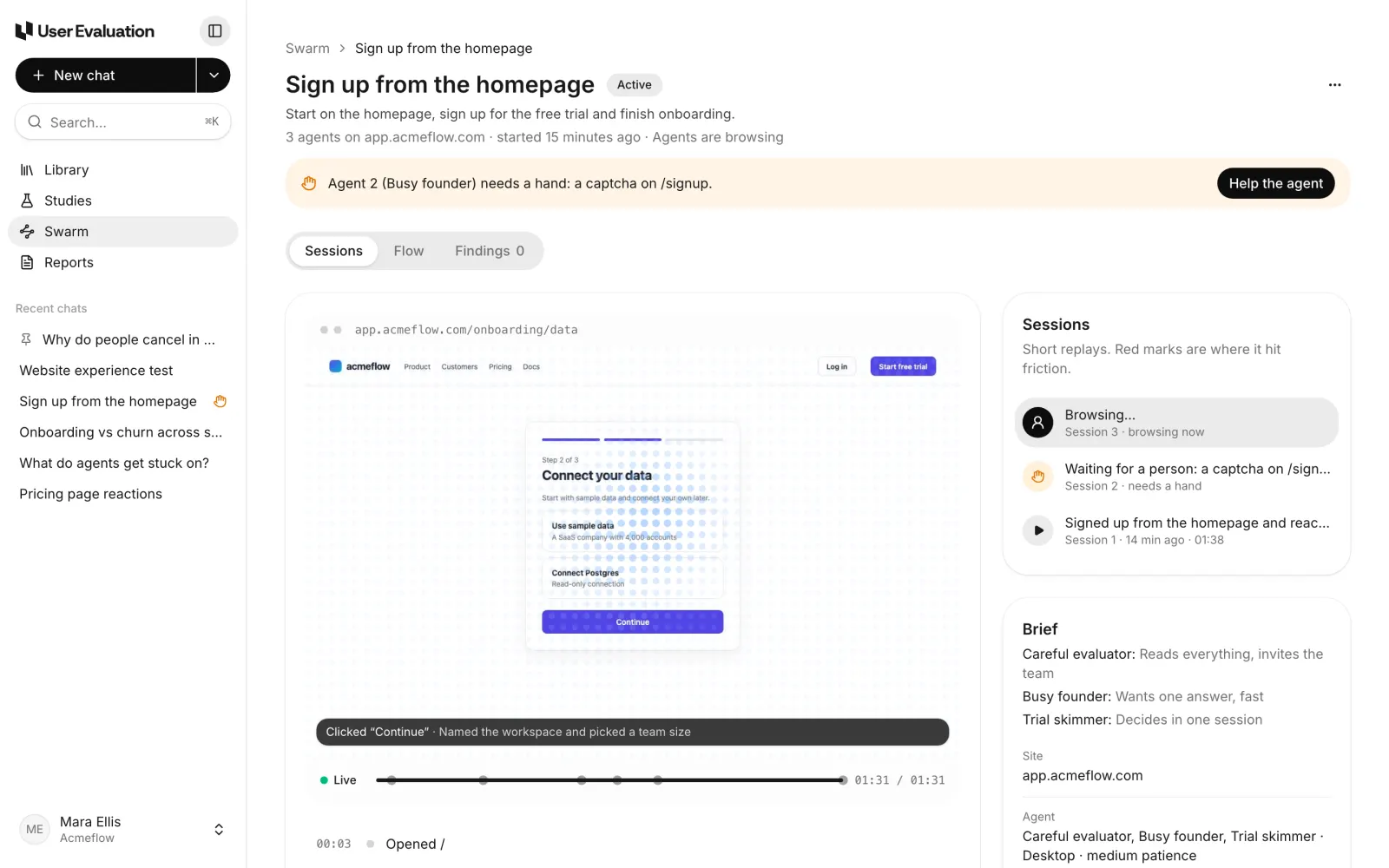
- You are told where you already are. The hand shows on the run page and in the run's chat with Eva, the AI assistant in User Evaluation.
On the run page, a banner names the agent and the page: "Agent 2 (Busy founder) needs a hand: a captcha on /signup." The waiting session also shows a small hand in the Sessions list, so you can see at a glance which agent is held up and which are still browsing.
The hand also reaches your chat
If you set the run up in a chat with Eva, that chat gets a message too, with a card that says which agent is waiting, on which page and why, and a Help the agent button. The chat moves to the top of Recent chats with a small hand next to it, so it is easy to find from anywhere in the app.
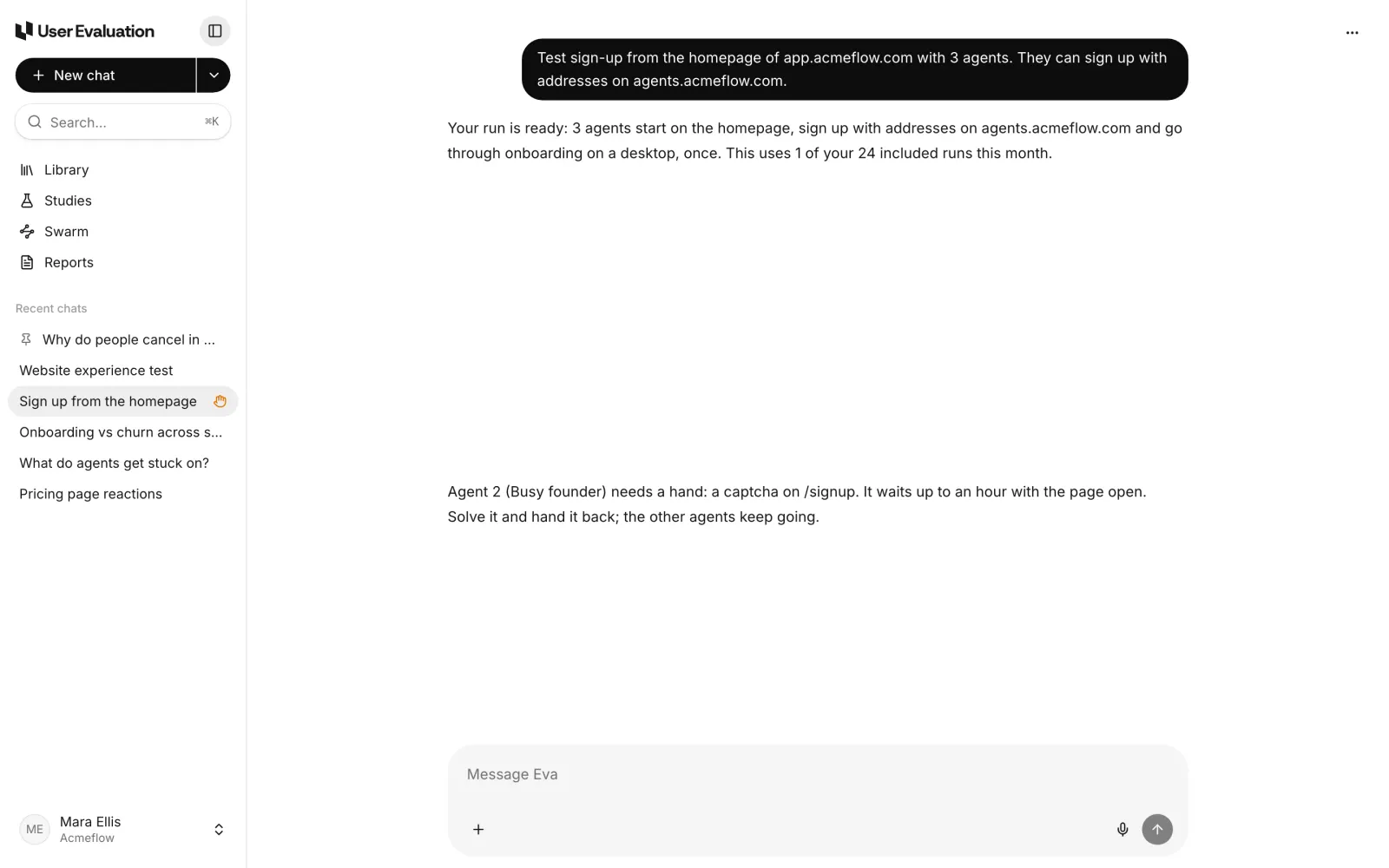
The card keeps up with what happens next. Once you hand the page back it reads "Handed back". If nobody helps in time, it says so.
Taking over the live browser
Help the agent opens the agent's browser in a pop-up over the run page. You see its page live, refreshed a couple of times a second, with the address it is on and how long it will wait.
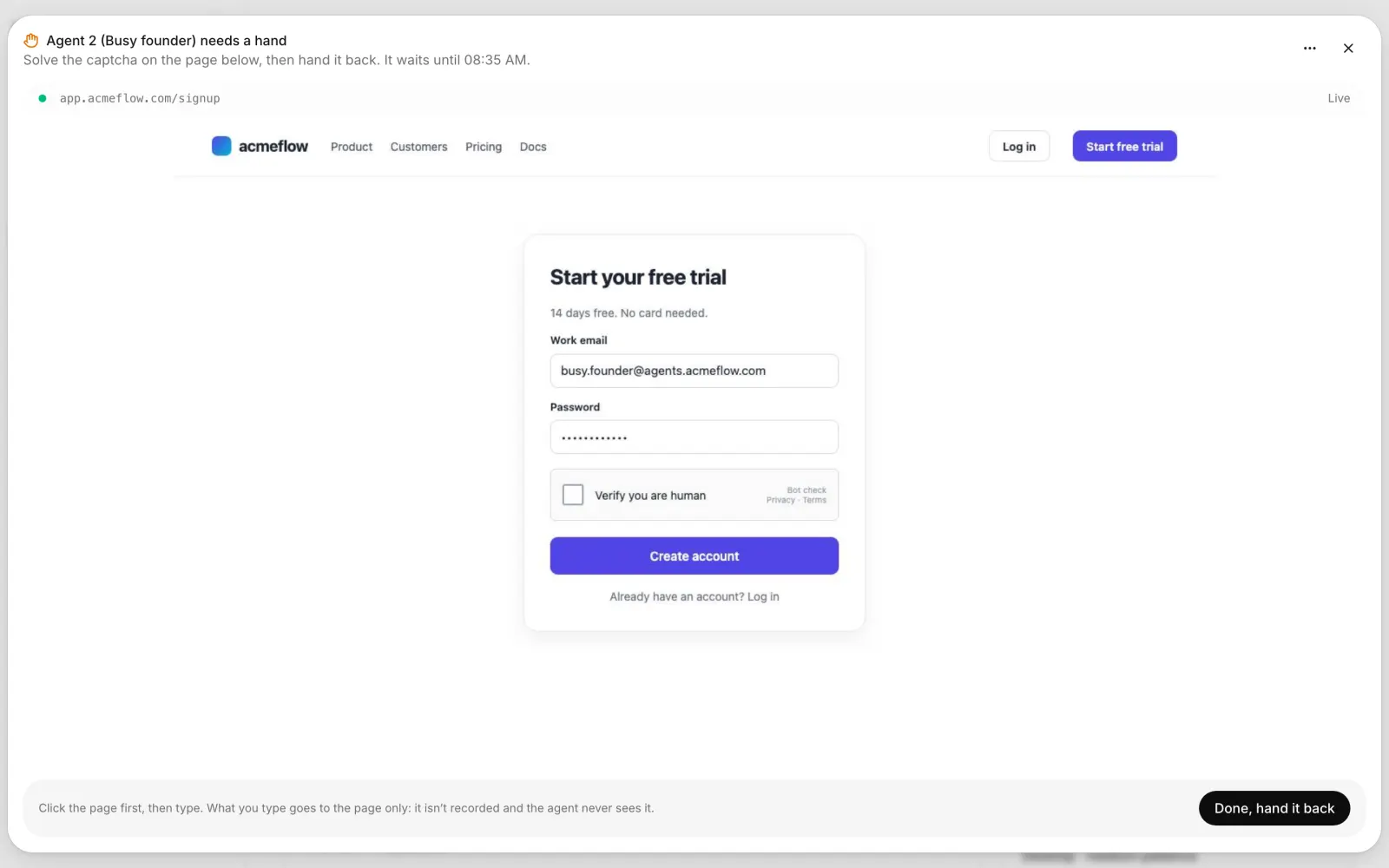
From there you use the page as if it were your own browser:
- Click anywhere on the page. Your click lands at the same spot on the real page, whatever size the pop-up is.
- Type after clicking a field. Enter, Backspace, Tab, Escape and the arrow keys work, and so does paste.
- Scroll with your wheel or trackpad. On a phone, scroll buttons appear in the address bar.
When the check is done, press Done, hand it back. The agent is told that a person solved the challenge, and it carries on from the page as it is now. If you would rather end that agent's session, Stop this agent is in the ⋯ menu. The other agents keep going either way.
What stays private
Helping an agent means typing into its browser, and sometimes that means typing something you would not want in a test log. So we made a few firm rules.
- What you type goes to the page only. It is not recorded in the session's steps, and the agent's model never sees it. Fields you typed into are marked as "filled in by a person" in what the agent reads.
- Only your workspace can help. Someone from another workspace gets an error. Observers in your own workspace can watch the session but can't control it.
- Input is rate limited, so a stuck key or a runaway script can't flood the page.
How long an agent waits
An agent waits up to an hour with its page open. The run's chat tells you how long, and the pop-up shows the time it waits until. If nobody helps in that time, the session ends with a plain note and the rest of the run is unaffected. An agent can raise its hand up to three times in one session, and a page you have already cleared won't ask again.
Pausing a run releases any agents waiting at a captcha. They try again when you resume.
When to skip the hand-off altogether
The hand-off is for the captcha you can't avoid, such as testing a live signup page exactly as visitors see it. If you control the site, there are quieter options:
- Run against a staging environment with the captcha turned off.
- Allowlist the agents with the run's custom header, which you set in Edit run settings under Access. Your bot protection can let requests with that header through.
Both keep the run moving with nobody watching.
Why this matters for the findings
A captcha is not a usability problem with your product, so we don't report it as one. Agents are told not to note captchas as friction, and the summary of a run's findings never mentions them. What you get instead is the part of the journey after the check, which is usually the part you wanted to test.
It also changes what a run can reach. Signup flows, contact forms and checkout steps are often behind exactly this kind of check. With a person on hand for a few seconds, agents can now test the pages that matter most for activation.
Try it on your own site
The hand-off is on for every Swarm run, on every plan. Each plan includes Swarm runs every month (1 on Free, 5 on Pro and 25 on Team), and after that each extra run is $2, which you confirm before it starts. See how Swarm works and the pricing page for the details.
If you are new to agent testing, our guide to synthetic users versus real participants explains where AI agents help and where only real people will do. Swarm sits on the agent side of that line, and anything important it finds can go to real people next.