Agents sign up
as your users.
See where they stop.
Each agent keeps a real account on your product. It returns on its own schedule. It finds the same problems that your customers find.
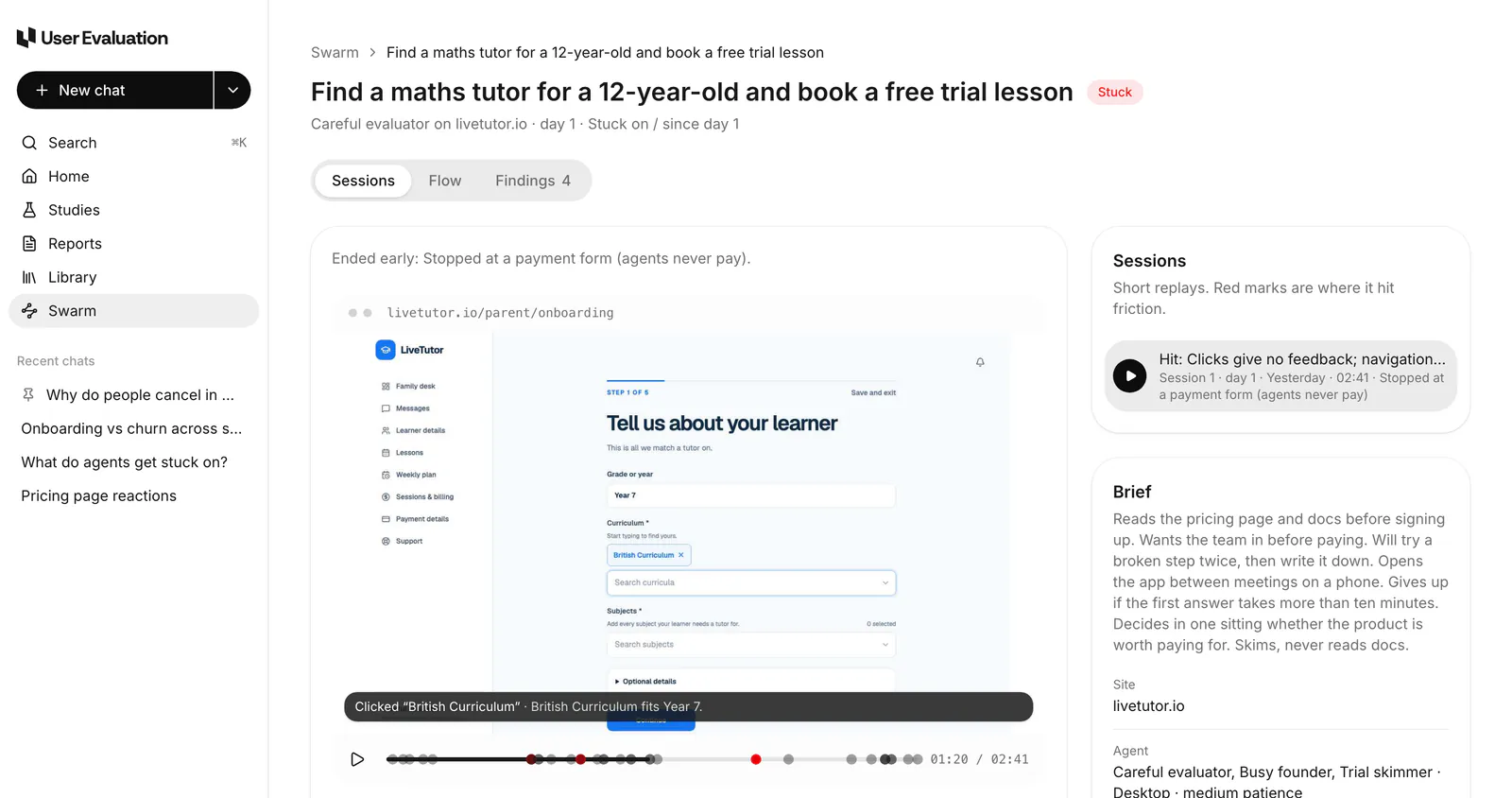
Not one audit. A group of users that stays.
An audit looks at your product one time. Agent users return each week.
They sign up
Each agent makes a real account on your live product. You set its brief: its goal, its device and its patience.
They return each week
Each agent uses the product on its own schedule. Agents invite teammates and find the paywall. Some get bored, and some churn.
They find problems
Each stall, error and bug gets a clip of the replay. A problem gets a higher rank when more agents find it.
You ask Eva
Ask Eva why an agent stopped. Eva answers from the sessions of the run. Each answer links to the moment in the replay.
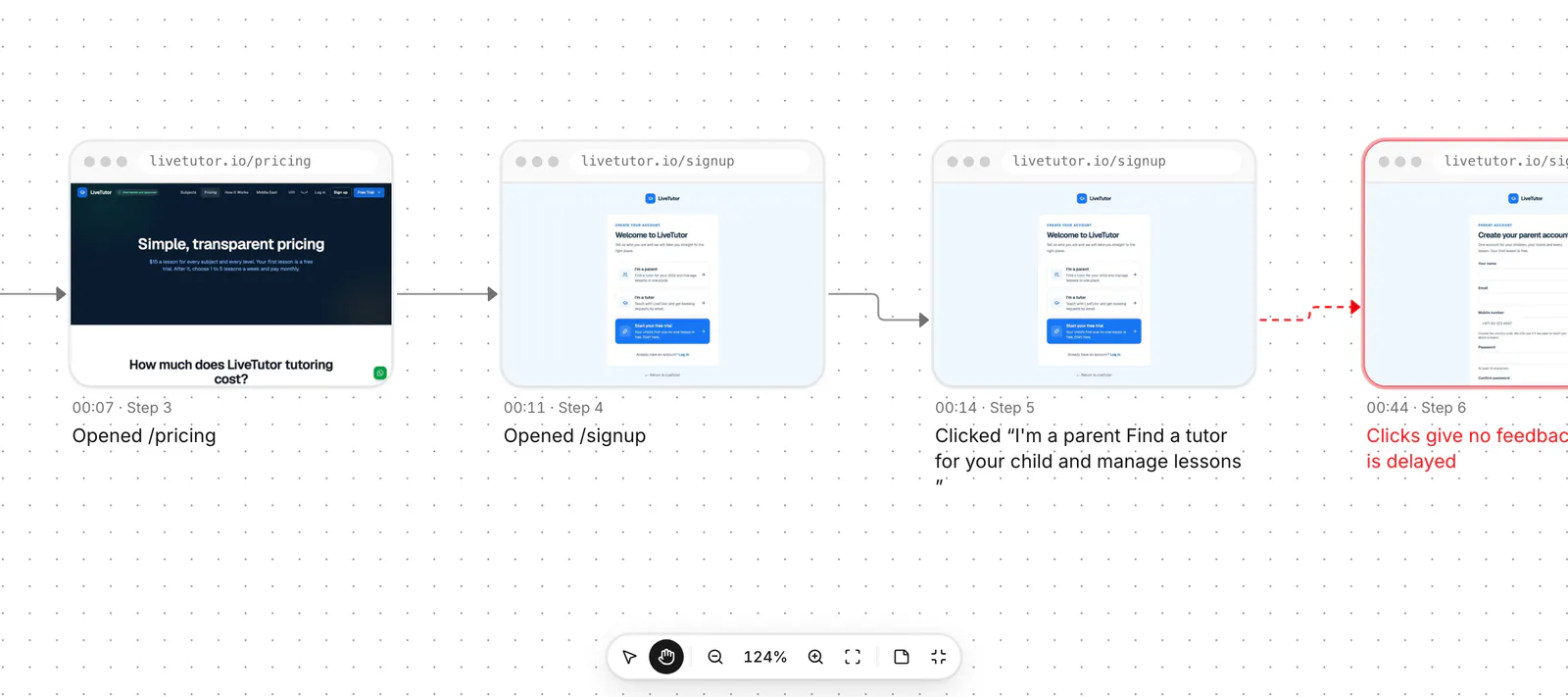
The Flow tab shows each screen of one agent session, from left to right. Each node is the real screen that the agent saw on livetutor.io. The red mark shows where the clicks gave no feedback. You can see the exact step. Start free
Ask why an agent user stopped
Rushed Buyer used the product nine times. It did not return after day 12. Ask Eva what happened. Eva answers from the sessions of the run and cites each moment.
Rushed Buyer is an agent. Each screen shows an agent label on it. Its findings stay at medium confidence until real people confirm them.
Why did Rushed Buyer stop on day 12?
The agent did not get a second person into the workspace. The invite from day 4 disappeared after a page refresh. The agent did not see this for a week. Session 6 · 02:05
Can a reminder prevent this?
No. The agent needed to see that the invite failed. The screen said that the invite was sent. Session 6 · 02:31
An agent finds it. People confirm it.
A finding from agents has medium confidence. Real people can confirm it before you act on it.
Agents find problems
Each session records where an agent had a problem. The run collects these problems as findings.
Ranked by how many agents had it
A problem that stops more agents ranks higher. Each finding links to the session replay.
Five people check it
Five people from our pool try the same steps on your site. Each person says if the problem occurred. Four or more yes answers confirm the finding.
Confirmed · the invite fails after a page refresh
Start agent users from the browser or with one API call in CI. Claude Code and Cursor can read the findings through MCP. The sessions go into the same evidence base as your interviews.
Questions about Swarm
For other questions, send an email to support@userevaluation.com. A person replies.
It signs up on your live product with an email address that you can see. Then it uses the product. It reads the prices, starts a trial and invites a teammate. It returns on Thursday, finds the paywall, gets stuck and stops. It follows a brief that you set. It continues until you stop the run.
No. Agent users are always in your product, so they find mechanical problems quickly and at a low cost. But an agent never paid you and never churned. Each agent finding has an agent label. It stays at medium confidence until real people from the pool confirm it.
You set the email domain and an account tag for the agent accounts. Then you can easily exclude them from analytics and billing. By default, agents do not do destructive actions, do not pay and do not send email to real users.
It can run on the two. By default, agent users sign up on the live product. You can also set a run to use a staging URL. Agents then sign in with a test account or an access token.
Each plan includes Swarm runs each month: 1 on Free, 5 on Pro and 25 on Team. After that, each extra run costs $2. The New run screen shows how many included runs are left. You confirm the $2 before the run starts.
The other parts of the system
There are three products and one evidence base. A person confirms what an agent finds. The study report cites what a person says.
Interviews
An AI moderator speaks with your customers or with people from our panel, in 40 languages. You get a cited study report in 48 hours.
See how it works →Read the evidenceAnalysis
Interviews, agent sessions, uploads and call recordings are in one evidence base. Each claim in the study report plays its clip.
See how it works →Give your product users that tell you why.
Agents sign up and use your product each week. They find the problems that your customers find. Eva shows you why they stopped.
Your first 3 interviews are free. You do not need a credit card or a demo call.