A person using your site sees the page. A developer watching them also sees what the page doesn't show: the error in the console, the request that came back with a 500, the call that took twelve seconds. The best usability sessions have both views at once, because the reason a button "does nothing" is usually sitting in the network tab.
Until this month, a Swarm agent read the page as text and structure, the way a screen reader would. That is good for finding a button and poor for noticing that the button sits behind a banner, or that the table runs off the edge of the screen. Now agents get both views a good session has: a picture of the page, and the errors behind it.
A screenshot every turn
Each time an agent looks at the page, it now gets a screenshot of what is on screen alongside the page's text. It is told to use it: if something looks broken, overlapping, cut off or missing, that is friction worth noting, even if the page's structure looks fine.
That catches a class of problems text alone misses:
- Layouts that break at a certain width, like a pricing table cut off on a laptop screen.
- Things covered by other things, like a cookie banner on top of the button that matters.
- Empty or half-drawn states, like a chart area that never fills in.
To keep runs economical, only the newest screenshot stays in the agent's memory. Earlier ones are dropped as it moves on.
The errors a visitor never sees
With each look at the page, the agent also gets what changed behind it since its last action:
- Console errors and uncaught page errors.
- Failed requests, and responses with 4xx or 5xx status codes. For your own site it sees the method and path; for third parties, only the host name.
- Slow requests from your own site that took longer than 5 seconds.
Each problem is reported once, and only a handful at a time, so a noisy page doesn't drown the agent. Query strings, request bodies and headers are never included, and the text goes through the same masking as everything else the agent records.
The agent is told to use these the way a good tester would: errors that explain what went wrong are evidence, and background noise a visitor would never notice is ignored.
What it looks like in a run
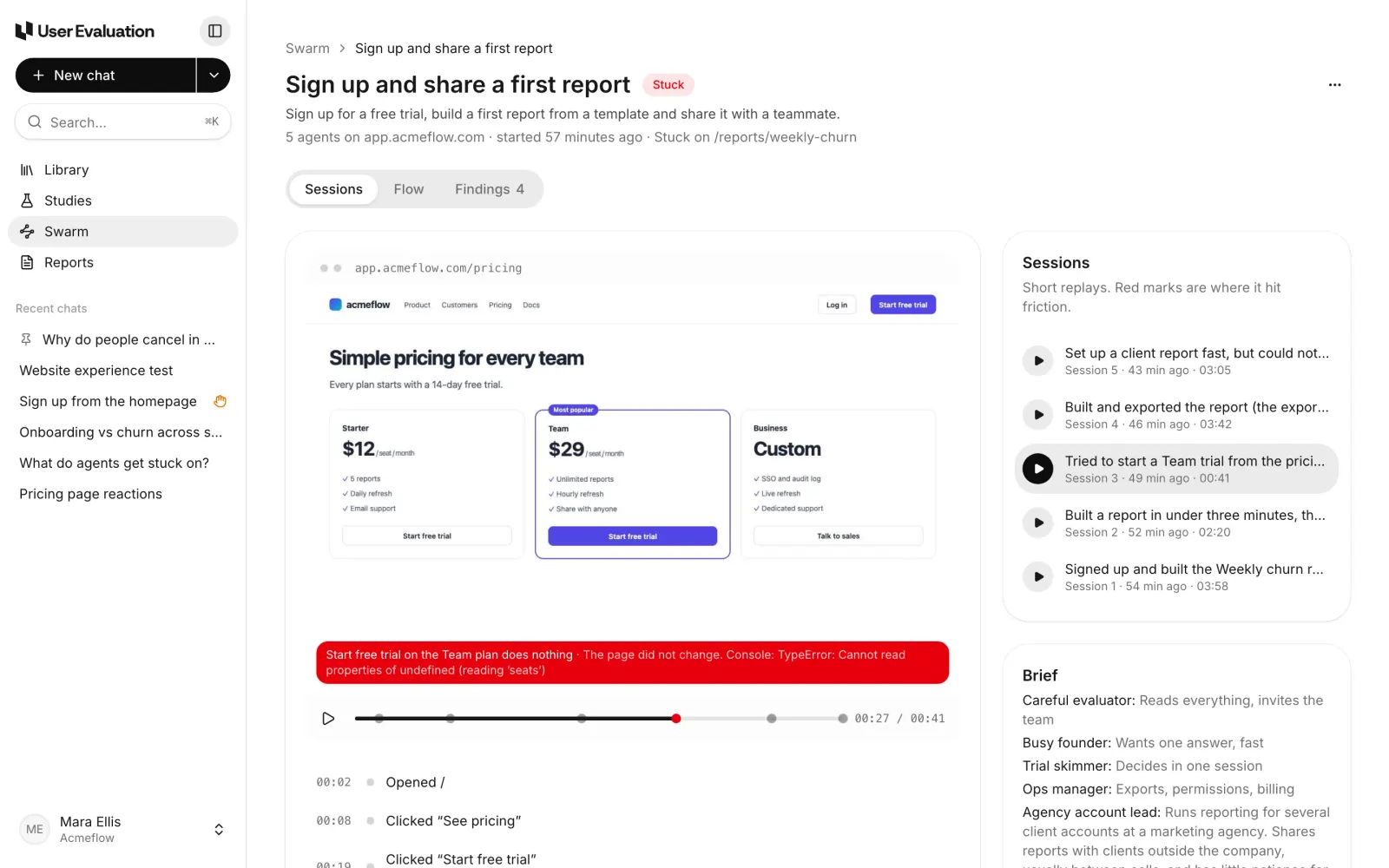
Here is one of our demo runs. An agent playing a "trial skimmer" persona went to the pricing page and pressed Start free trial on the most popular plan. Nothing happened. From the outside, that is a vague complaint. With the console in view, the agent's note says why:
Another agent, an "ops manager", built a report and tried to share it. The Share dialog stayed open with no message. The failed request explains it:
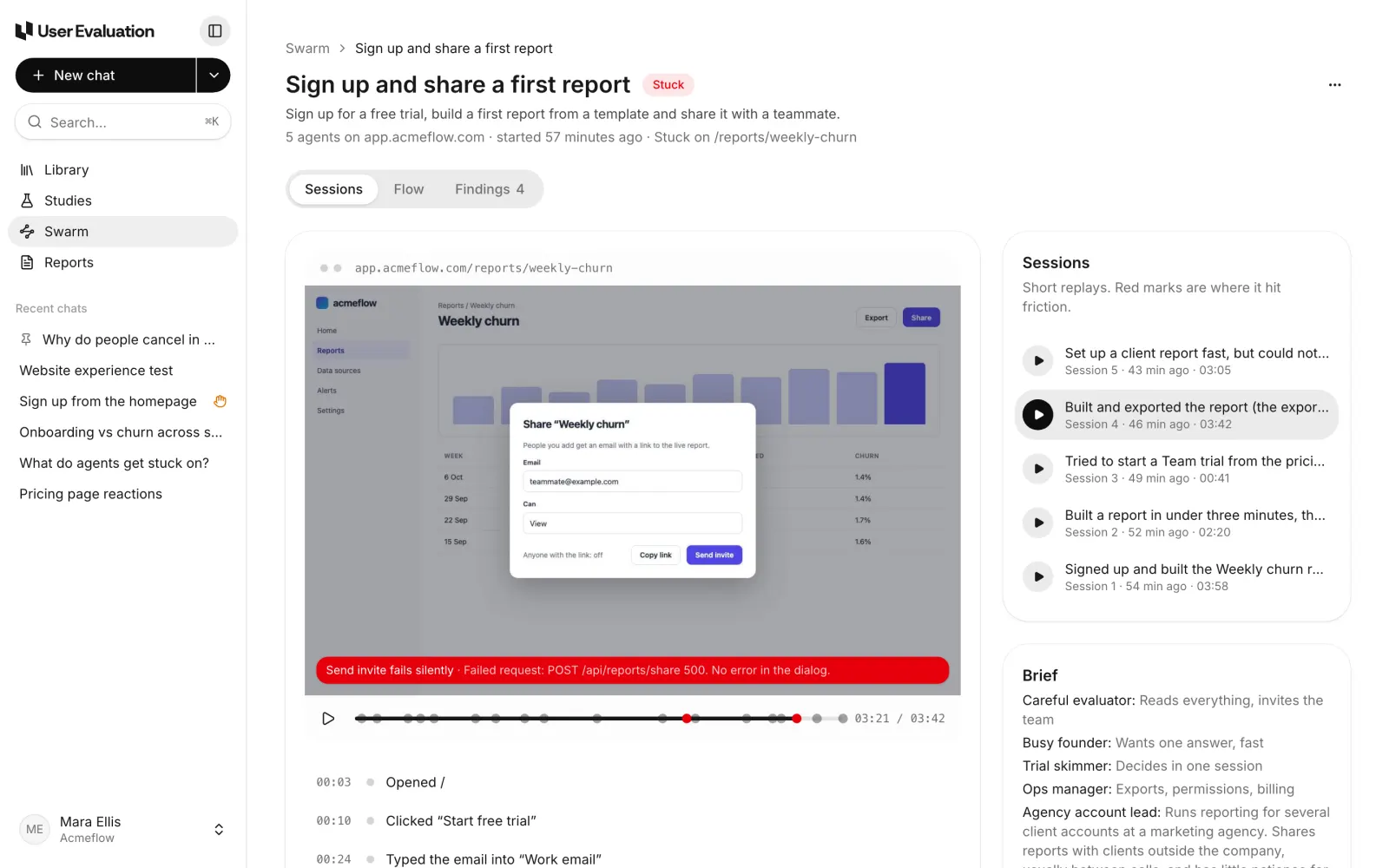
The same session shows the slow side too. Exporting the report took 41 seconds, and the agent, which now waits out pages that say they are working, recorded the slow request with its time.
Findings that are useful to engineers
This changes who a Swarm run is for. A finding that says "sharing doesn't work" goes to a product manager. A finding that says "POST /api/reports/share answers 500 and the dialog shows no error" can go straight to an engineer, with steps to reproduce and the screenshot from every session that hit it.
It also keeps product and engineering looking at the same evidence. The usability problem (no message when sharing fails) and the technical fault (the 500 behind it) are one finding, not two tickets in two tools.
What agents still ignore
Two things are deliberately left out of findings:
- Captchas. A captcha is not a problem with your product. Agents don't note them as friction, and the run summary never mentions them. When one blocks an agent, it raises a hand for a person instead; see Captcha hand-off.
- Errors a visitor wouldn't notice. A failed analytics ping or a warning from a third-party script is noise unless it explains what the agent saw.
Where you see it
You don't need to change anything to get this. Every run now does it.
- In the replay, friction steps show in red with the agent's note, including any error or request that explains it.
- In the Findings tab, each finding lists its steps to reproduce and opens to the real screenshots from every session that hit it. We cover that in our post on triaged findings and the flow map.
A note on what this is, and what it is not
Swarm is not a replacement for your test suite or your error monitoring. Those watch every request, all the time. A Swarm run is closer to a set of attentive first-time visitors who happen to have the developer tools open. It finds the errors that sit on the paths people actually take, and ties each one to the moment in the journey where it hurt.
Plans include Swarm runs every month (1 on Free, 5 on Pro and 25 on Team), with extra runs at $2 each; see the pricing page. To see the whole product, start with how Swarm works.