There is a particular kind of impatience that comes with starting a test. You press Start, and then you want to know: is anything happening? Are the agents on my site right now? Did one of them already hit the thing I was worried about?
This month we rebuilt the Swarm run page to answer those questions while the run is still going. You can watch agents work, follow one of them step by step as it browses, and replay any session the moment it ends.
A run page that is clearly alive
When agents are browsing, the run page says so without making you read anything:
- The Active badge shimmers next to the run's name.
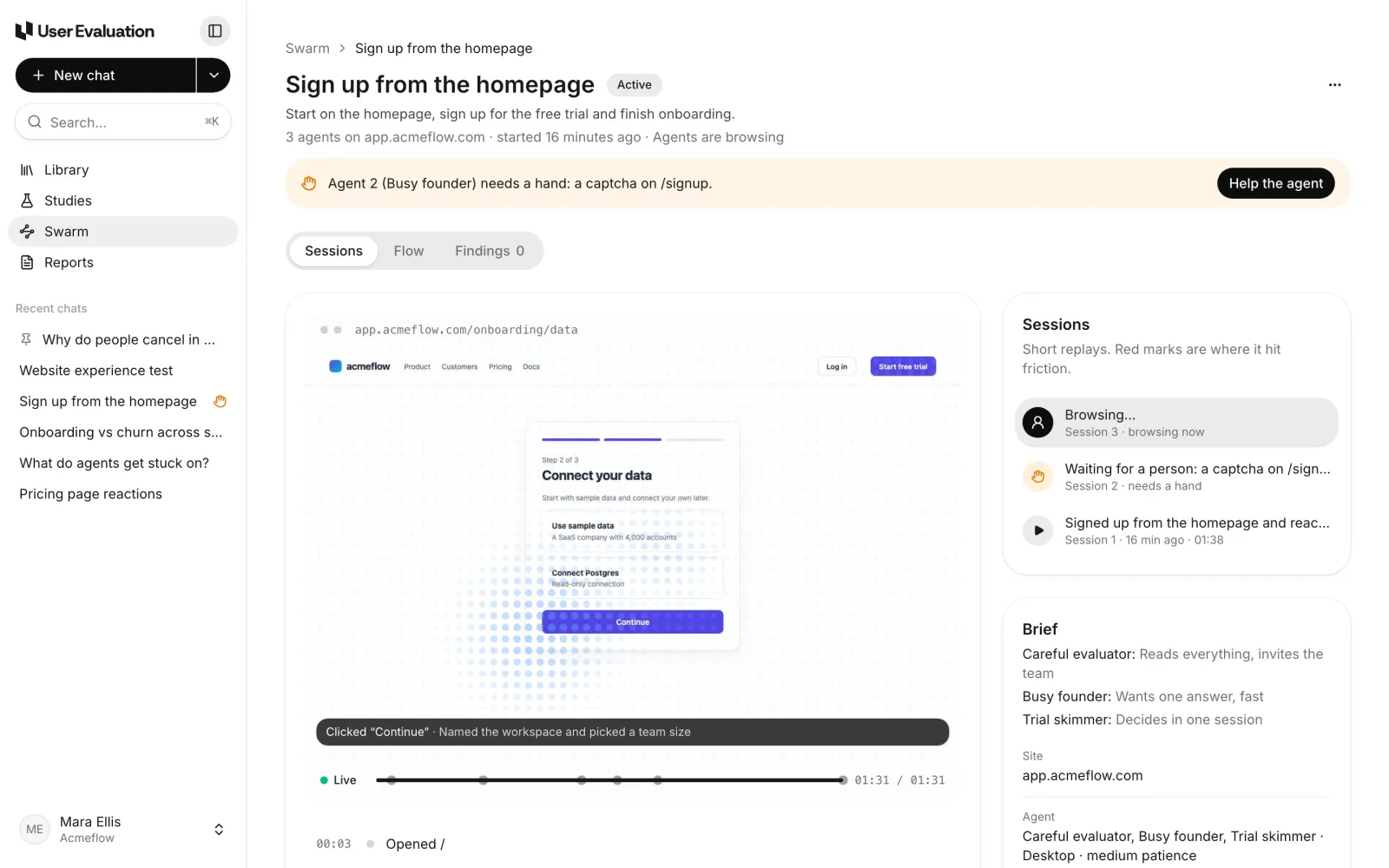
- Each browsing session in the Sessions list shows a person icon and a shimmering line, with "browsing now" under it.
- A waiting agent shows an amber hand instead, with "needs a hand". That is an agent at a captcha, waiting for someone to help; see Captcha hand-off.
- Finished sessions show a play button, how long ago they ran and how long they took.
The page keeps itself fresh while anything is running, so you don't need to reload it.
The replay follows the agent
Open a session that is still running and the replay follows its newest step as it arrives. Where the play button would be, a green Live marker shows that you are watching the latest moment. While the agent is browsing, a soft grid of dots drifts across its screen so you can tell a live view from a paused one at a glance. (With reduced motion on in your system settings, it stays still.)
Each step shows the screenshot taken right after it, with a caption of what the agent did and, where it gave one, why. "Clicked Continue · Named the workspace and picked a team size" tells you more than a cursor moving across a page.
You can step back at any time. Click an earlier step, or a tick on the timeline, and the replay pauses there. Press Play and it catches up to live again.
Fast replays of finished sessions
Once a session ends, its replay plays the whole visit as a quick run through the screenshots, a step every half second or so. Every screenshot loads up front, so playing never stalls between steps. A four-minute session takes seconds to skim, and red ticks on the timeline show exactly where the agent hit friction.
The frame takes the shape of the agent's own screen. Desktop sessions are wide, phone sessions are tall and capped to fit your window, so the address bar and the controls line up with the page.
Under the replay, the full list of steps reads like a test log:
- the time into the session,
- what the agent did ("Clicked Share", "Typed the email into Work email"),
- its reason, in a line underneath,
- and friction steps in red.
Click any step to jump the replay there.
Times that make sense
Small thing, big difference: runs now say how long they have actually been running. The run page reads "started 14 minutes ago", and the brief reads "Running for 4 minutes · 1 session". Day numbers ("day 3") only appear for runs that come back every day or every week, where they mean something.
We also took the model's running cost off the run page. It told you nothing about your site and made a five-agent test feel like a taxi meter. What you pay is the run, against your plan's included runs.
The run list shows who is working
On the Swarm page, a run with agents browsing shows a row of small moving dots next to its state, with a label such as "2 agents working". The list refreshes while any run is working, and the dots stop when the agents do.
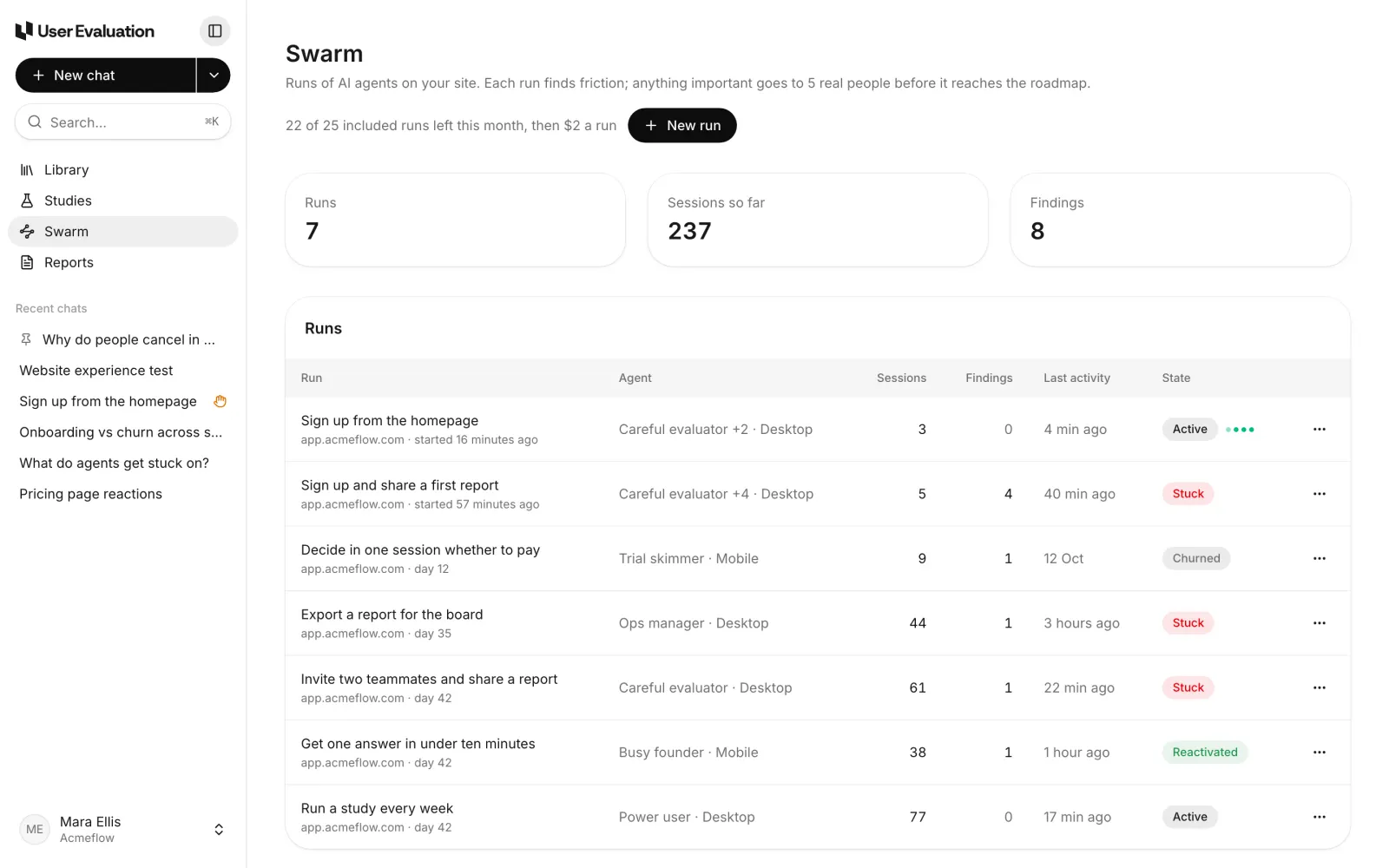
The header shows how many of your included runs are left this month and what an extra run costs, so you know before you press New run.
The run card stays in your chat
If you set a run up by chatting with Eva, the AI assistant in User Evaluation, the run's card stays at the end of that chat with an Open run button. That chat becomes the run's conversation: if an agent needs a hand, the message lands there, and the chat moves to the top of Recent chats. You can also ask Eva about the run from the run page itself, such as "Why did session 2 stop?", and she answers from the sessions, citing the moments she means.
When to watch, and when not to
You don't have to watch a run. Most people press Start, get on with their day, and read the findings when the run settles. Watching live is worth it when:
- you are testing a fix, and want to see an agent get past the step that used to break;
- you expect a captcha, and want to be there to hand the page back;
- you are showing Swarm to your team for the first time, because watching an agent read your pricing page is a good way to make the point.
For everything else there is the replay, and the findings, which collect what every agent hit into one triaged list. Read about those in triaged findings and the flow map.
Each plan includes Swarm runs every month, with extra runs at $2 each; see the pricing page and how Swarm works.